Mesh Retargeter
How to Launch
Launch the tool from the dedicated menu or with the following command.
import faketools.tools.model.mesh_retargeter.ui
faketools.tools.model.mesh_retargeter.ui.show_ui()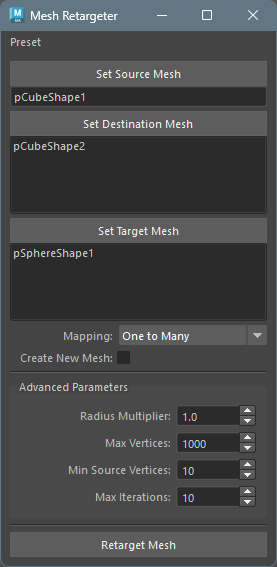
Usage
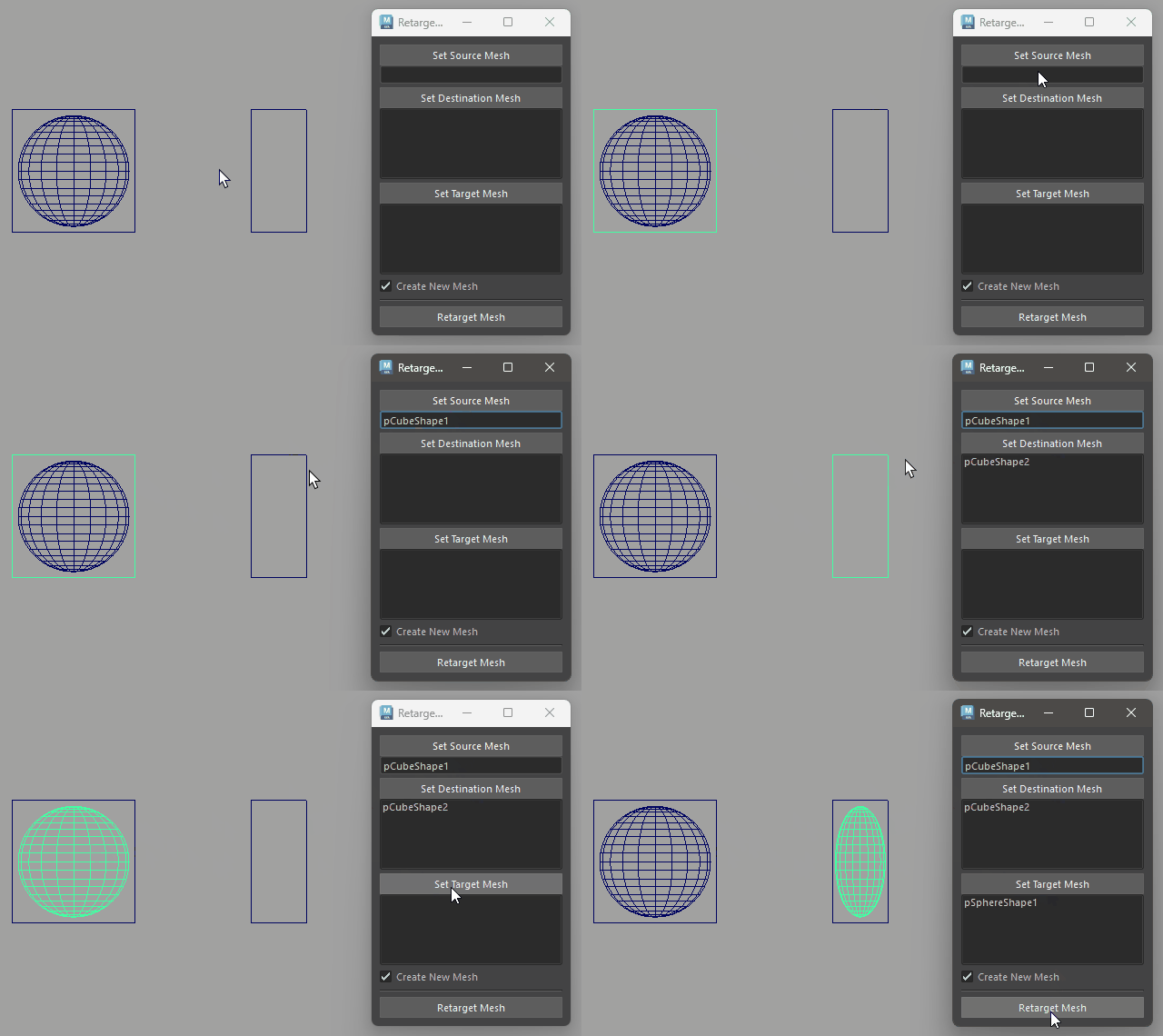
To use the tool, follow these steps:
- Select the source geometry for deformation and press
Set Source Meshbutton. - Select the destination geometry for deformation and
press
Set Destination Meshbutton (multiple selection allowed). Only meshes with the same topology as the Source Mesh can be set. - Select the target geometry to deform and press
Set Target Meshbutton. - Select a mapping mode from
Mapping. - If creating new geometry, check the
Create New Meshcheckbox. - Press
Retarget Meshbutton.
Mapping
Select how Destination Meshes and Target Meshes are paired.
One to Many (default)
All Target Meshes are deformed for each Destination Mesh (M x N combinations).
- Create New Mesh on: A new mesh is created for each combination.
- Create New Mesh off: Only one Destination Mesh can be specified.
One to One
Pairs Destination Meshes and Target Meshes one-to-one. Destination[0] maps to Target[0], Destination[1] maps to Target[1], and so on.
- The number of Destination Meshes and Target Meshes must be equal.
Advanced Parameters
You can obtain more accurate transfer results by adjusting advanced setting parameters.
Radius Multiplier
- Default Value: 1.0
- Range: 0.5 ~ 10.0
- Description: Radius multiplier for searching source mesh vertices.
- How to use:
- When meshes are small or far apart, increase the value (e.g., 2.0 ~ 5.0)
- If deformation isn’t working well, adjusting this value may improve results
- If the value is too large, the influence range may be too wide, causing unintended deformation
Max Vertices
- Default Value: 1000
- Range: 100 ~ 10000
- Description: Maximum number of vertices per group when processing target mesh.
- How to use:
- When target mesh vertex count exceeds this value, it’s automatically divided into multiple groups for processing
- Reducing the value divides large meshes into finer groups (processing becomes slower but accuracy may improve)
- Increasing the value speeds up processing but increases memory usage
Min Source Vertices
- Default Value: 10
- Range: 4 ~ 100
- Description: Minimum number of source mesh vertices used for deformation calculation.
- How to use:
- Increasing the value improves deformation accuracy but increases processing time (e.g., 20 ~ 50)
- Reducing the value speeds up processing but may reduce accuracy
- At least 4 vertices are required (cannot calculate correctly with fewer than 4 vertices)
Max Iterations
- Default Value: 10
- Range: 1 ~ 20
- Description: Maximum number of attempts to automatically adjust search radius when insufficient source vertices are found.
- How to use:
- The default value (10) is usually fine
- Increasing the value attempts more tries to find appropriate vertices
- If errors occur, we recommend adjusting Radius Multiplier rather than increasing this value
Notes
- Source Mesh and Destination Mesh must have the same topology. Topology is automatically validated when setting Destination Meshes.
- In
One to Manymode withCreate New Meshoff, only one Destination Mesh can be specified. - In
One to Onemode, the number of Destination Meshes and Target Meshes must be equal. - Processing may take time when Target Mesh has many vertices.
- Retarget operations support Undo/Redo.