Transform Creator
How to Launch
Launch the tool from the dedicated menu or with the following command.
import faketools.tools.rig.transform_creator_ui
faketools.tools.rig.transform_creator_ui.show_ui()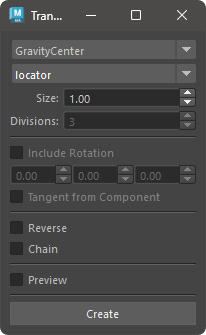
Basic Usage
- Select transform creation method from dropdown menu at top.
- Select transform nodes or components in scene.
- Set other options. Options that are not grayed out can be set.
- Press [ Create ] button to create transform nodes.
※ Selectable components are: Vertex, Edge, Face, CurveCV, CurveEP, SurfaceCV.
Options
- Node Type
- Select either locator or transform.
- Divisions
- Only valid when creation method is innerDivide. Sets how many divisions between selected nodes.
- IncludeRotation
- Sets whether to include rotation attribute in created transform nodes.
- Offset rotation values
- Sets values to offset rotation for created transform nodes.
- Tangent from Component
- For Vertex, Edge, obtains tangent vector from components connected to that component and sets rotation.
- Reverse
- When transform nodes are created by duplication, reverses their order.
- Chain
- When transform nodes are created by duplication, makes them chain-like hierarchy structure.
Creation Methods
- GravityCenter
- Creates transform node at center of gravity of selected nodes.
- BoundingBoxCenter
- Creates transform node at center of bounding box of selected nodes.
- EachPositions
- Creates transform nodes at each position of selected nodes.
- InnerDivide
- Divides between selected nodes and creates transform nodes between them.