Mesh Mirror
Overview
A tool for mirroring or flipping mesh vertex positions across the X axis (YZ plane).
Key features:
- Mirror: Copy vertex positions from one side to the other (overwrite)
- Flip: Exchange left/right vertex pair positions using the symmetry table (asymmetry swaps sides)
- Single Mesh mode: Operate on left/right symmetry within a single mesh
- Dual Mesh mode: Operate between separate left/right mesh pairs
- Batch processing: Mirror / flip multiple targets at once using the same table
- Asymmetric mesh support: Two fallback methods for vertices that fail to match in the symmetry table
How to Launch
Launch the tool from the dedicated menu or with the following command.
import faketools.tools.model.mesh_mirror.ui
faketools.tools.model.mesh_mirror.ui.show_ui()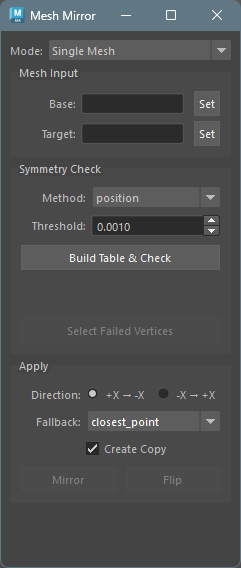
Usage
Basic Steps (Single Mesh Mode)
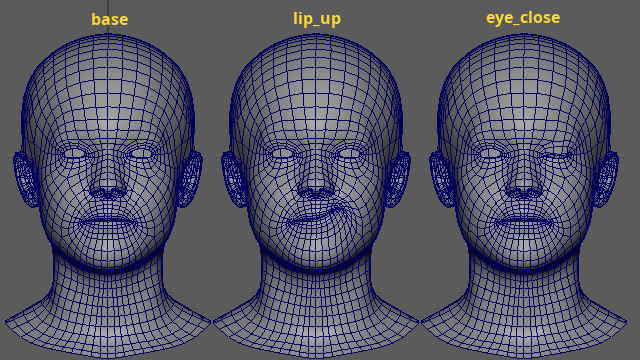
Select a symmetric base mesh in the Maya viewport and click the
Setbutton next toBaseto register it.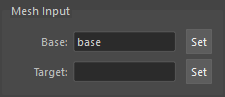
Select the target mesh(es) you want to mirror / flip, and click the
Setbutton next toTargetto register them. Multiple targets can be selected at once.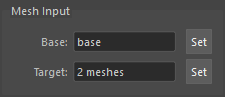
In the Symmetry Check section, set
MethodandThreshold, then click theBuild Table & Checkbutton to build the symmetry table.Review the check results. If there are Failed or Asymmetric vertices, click the
Select Failed Verticesbutton to inspect them on the base mesh.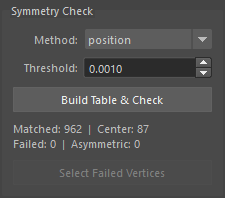
In the Apply section, set Direction and Fallback, then click
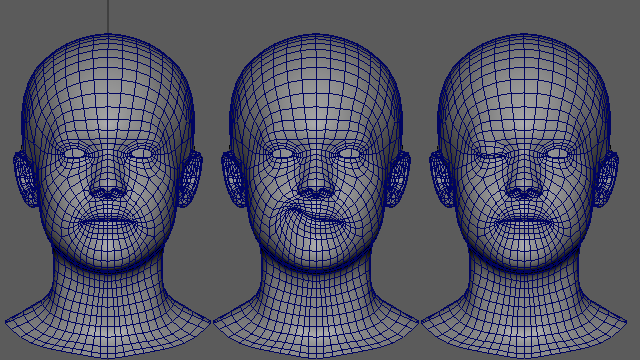
MirrororFlipto execute. If theCreate Copycheckbox is on, the target mesh will be duplicated and the result applied to the copy.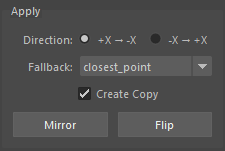
Flip result
Basic Steps (Dual Mesh Mode)
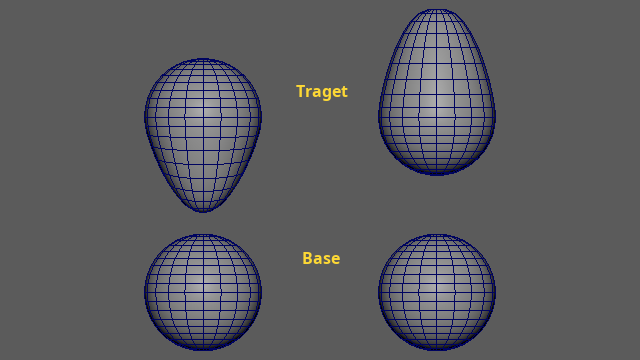
Switch Mode to
Dual Mesh.Register a symmetric base mesh pair in
Base A/Base B.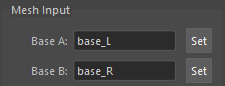
Register target mesh pairs in
Target A/Target B. The number ofTarget AandTarget Bmeshes must be equal.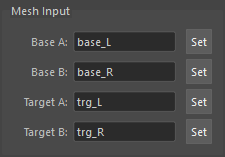
In the Symmetry Check section, select
Methodand click theBuild Table & Checkbutton to build the correspondence table from the base pair.In the Apply section, set Direction and Fallback, then click
MirrororFlipto execute.
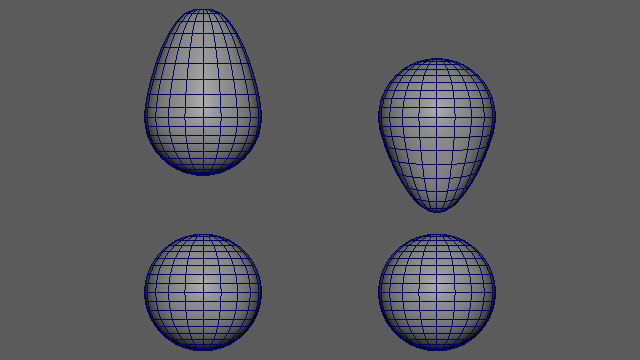
Flip result
Mesh Input Section
Register the base mesh and target meshes in this section.
- Base: The symmetric mesh used to
build the symmetry table. Select a mesh in the viewport
and click the
Setbutton to register. - Target: The mesh(es) to operate on.
Select multiple meshes and click
Setto register them in batch. A single mesh shows its name; multiple meshes show “N meshes”.
In Dual Mesh mode, four fields are
displayed: Base A / Base B and
Target A / Target B.
Note: Base and target meshes must have identical topology. If topology differs, an error is displayed when executing Mirror / Flip.
Symmetry Check Section
Build the symmetry table from the base mesh and verify its quality.
- Method: Select the table construction method (see below).
- Threshold: Set the distance threshold for vertex matching.
Click the Build Table & Check button
to build the table. The following information is
displayed:
| Item | Description |
|---|---|
| Matched | Number of matched pairs |
| Center | Number of vertices on the center axis
(Single Mesh only) |
| Failed | Number of unmatched vertices |
| Asymmetric | Number of pairs with asymmetric positions |
Click the Select Failed Vertices button
to select Failed and Asymmetric vertices on the base
mesh for inspection.
Matching Methods
Single Mesh mode:
| Method | Description |
|---|---|
position |
KDTree position-based matching. Fast. Best for cleanly symmetric meshes |
topology |
BFS face-connectivity matching. Handles slightly asymmetric meshes |
Dual Mesh mode:
| Method | Description |
|---|---|
position |
KDTree mirrored-position matching. For L/R meshes with different vertex order |
topology |
BFS face-connectivity matching. For heavily deformed but topologically identical L/R meshes |
index |
Direct vertex index correspondence (vtx[i] <-> vtx[i]). For L/R meshes split from the same source |
Apply Section
Execute mirror or flip operations.
- Direction: Select the mirror
direction.
Single Mesh:+X → -X(copy +X side to -X side) /-X → +X(reverse)Dual Mesh:A → B(mirror A’s shape to B) /B → A(reverse)
- Fallback: Select the processing method for Failed vertices (see below).
- Create Copy: When enabled, the target mesh is duplicated before applying the result. The original target remains unchanged.
Mirror vs Flip
Mirror copies vertex positions from the
source side to the destination side in one direction.
The source side is not modified.
pair(neg=3, pos=58) with +X → -X:
  vtx[3] = mirror_x(vtx[58])   -- -X side overwritten by source
  vtx[58] unchanged              -- +X side stays as-is
center vertices: X snapped to 0
Flip exchanges vertex positions between
left/right pairs. Both sides are modified. Asymmetric
shapes swap sides.
pair(neg=3, pos=58):
  new_vtx[3]  = mirror_x(old_vtx[58])  -- positions exchanged with X mirror
  new_vtx[58] = mirror_x(old_vtx[3])
center vertices: X multiplied by -1
Fallback Methods
Processing methods for vertices that failed to match in the symmetry table (Failed). Used when left and right sides have different vertex counts.
| Method | Description |
|---|---|
closest_point |
Find the closest point on the original mesh surface from the mirrored position. High accuracy, but may reference an incorrect face in concave regions |
laplacian |
Iteratively average neighbor vertex positions until convergence. Topologically safe, but slightly less accurate at reproducing curvature |
Script Execution
The tool can be used directly from scripts without the UI.
Basic Execution
from faketools.tools.model.mesh_mirror import command

# 1. Build symmetry table
table = command.build_single_table("base_mesh", method="position", threshold=0.001)

# 2. Execute mirror
op = command.SingleMeshOperation(target="target_mesh", base="base_mesh", table=table)
op.mirror(direction="+x", fallback="closest_point")
Running a Check
# Check base mesh symmetry
result = command.get_check_result_single("base_mesh", table, threshold=0.001)
print(f"Matched: {result.matched_count}, Failed: {result.failed_count}, Asymmetric: {result.asymmetric_count}")

# Select Failed + Asymmetric vertices
command.select_failed_vertices("base_mesh", result.failed_indices + result.asymmetric_indices)
Dual Mesh Mode Execution
# Build correspondence table
table = command.build_dual_table("base_L", "base_R", method="position", threshold=0.001)

# Mirror
op = command.DualMeshOperation(
    target_a="target_L", target_b="target_R",
    base_a="base_L", base_b="base_R",
    table=table,
)
op.mirror(direction="a_to_b", fallback="closest_point")

# Flip
op.flip(fallback="laplacian")
Notes
- All calculations are performed in object space. Transform position, rotation, and scale have no effect.
- The symmetry axis is fixed to the X axis (YZ plane).
- Base and target meshes must have identical topology. A mismatch produces an error at execution time.
- Operations are undoable. Batch processing of multiple targets can be reverted with a single undo.
- Only vertex positions are modified. Normals, UVs, and other mesh attributes are not affected.