Component Snap
Overview
A tool for snapping source components (vertices, CVs, lattice points) to target mesh positions.
Main features:
- Multiple matching methods: Index, closest surface position, and nearest vertex
- Blend: Adjustable snap rate from 0 to 100%
- Soft Selection support: Gradient snapping based on Maya’s Soft Selection weights
- Multiple component types: Mesh
vertices (
.vtx), curve/surface CVs (.cv), and lattice points (.pt) - Space modes: Toggle between world space and local space
How to Launch
Launch from the dedicated menu or with the following command:
import faketools.tools.model.component_snap.ui
faketools.tools.model.component_snap.ui.show_ui()
Usage
Basic Operation
- Select source components (e.g. vertices) in component mode.
- Ctrl + click the target mesh to add it as an object selection.
- Choose a matching method and click the
 button or the
  button.
Matching Methods
| Method | Description |
|---|---|
| Index | Matches components by vertex index. Use between meshes with identical topology. |
| Closest Pos | Snaps to the closest point on the target mesh surface. Supports arbitrary positions on faces (not limited to vertices). |
| Nearest Comp | Snaps to the nearest vertex on the target mesh. |
Blend
Set the snap rate using the slider or spinbox, then
click the button.
- 100%: Fully snap to target position (same as the Snap button)
- 50%: Move to the midpoint between source and target
- 0%: No movement
Soft Selection
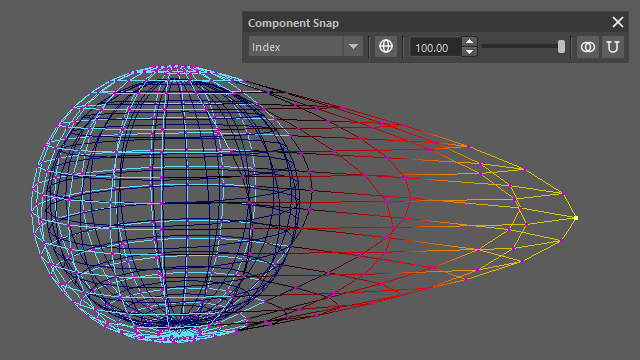
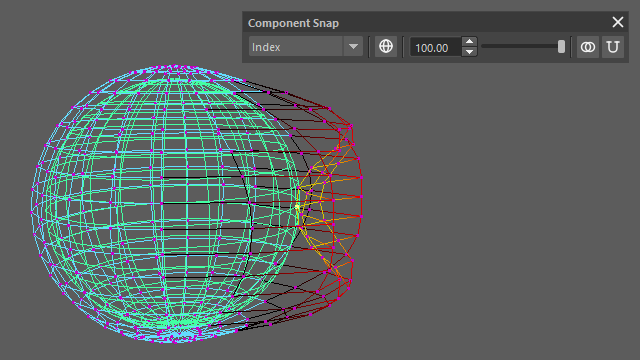
When components are selected with Maya’s Soft Selection enabled, each component’s Soft Selection weight is multiplied with the snap rate.
- Components closer to the selection center snap more strongly
- Falloff gradually decreases toward the periphery
Formula:
final position = current position + (target position - current position) × snap rate × Soft Selection weight
Before snap
After snap
Space Modes
Toggle using the toolbar button.
| Icon | Mode | Description |
|---|---|---|
 |
World | Calculates positions in world space (default) |
 |
Local | Calculates positions in object local space |
Supported Component Types
The following component types can be selected as source. The target is always a mesh.
| Component | Description |
|---|---|
Mesh vertices (.vtx) |
Polygon mesh vertices |
Curve CVs (.cv) |
NURBS curve control vertices |
Surface CVs (.cv) |
NURBS surface control vertices |
Lattice points (.pt) |
Lattice deformer points |
Scripting
You can run the tool directly from a script without the UI.
from faketools.tools.model.component_snap import command

# Get selection data (including Soft Selection weights)
source_data = command.get_selection_data()
# Returns: {node_name: {component_string: weight}}

# Execute snap
command.snap(
    components=source_data["pSphere1"],
    target_mesh="pSphere2",
    method="closest_position",  # "index", "closest_position", "nearest_component"
    space="world",              # "world", "local"
    blend=1.0,                  # 0.0 ~ 1.0
)
Notes
- Index matching supports single-indexed components
(
.vtx[N], curve.cv[N]). Multi-indexed components (surface.cv[U][V],.pt[S][T][U]) are not supported with this method. - All operations are undoable.